







 09.08.2023
How to Redeem and Use Vouchers
1. Checking Available Vouchers
- On the main page, tap “My Info”.
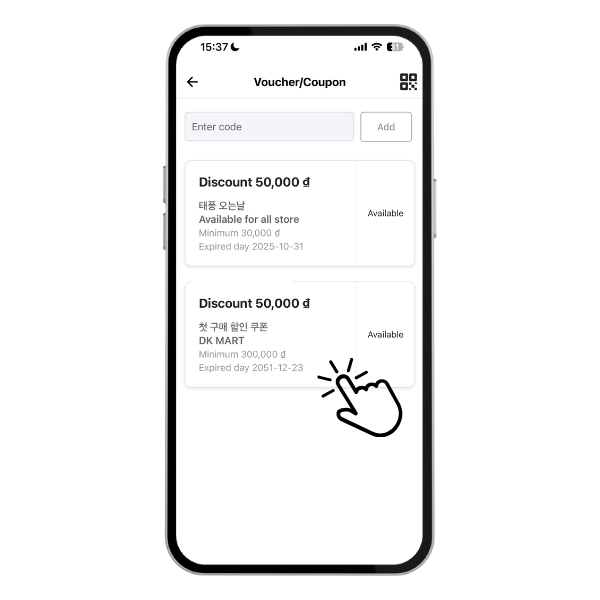
- Select “Voucher/Coupon”.
- To add new vouchers, enter your code and tap “Add” — you can get these from our social media events! All valid vouchers will appear on this page once registered.
2. Redeeming Vouchers
- On the Voucher page, tap any available voucher to view the applicable restaurants or shops.
- Place your order from an eligible shop, select your delivery method, and proceed to the next step.
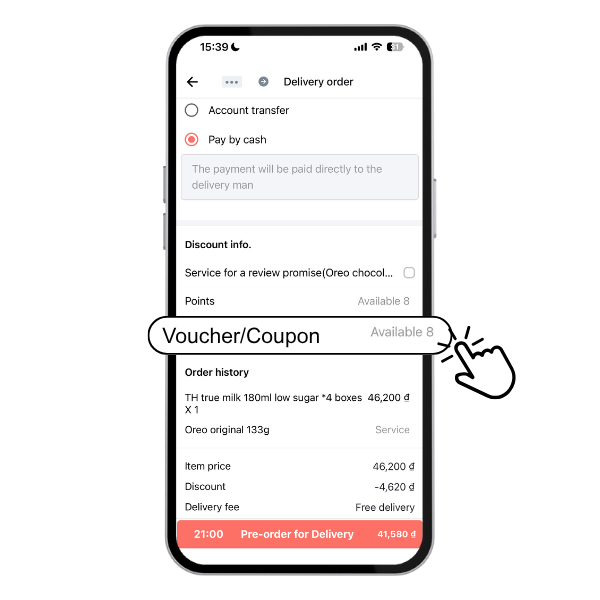
- Scroll down to the “Discount Info” section and tap “Voucher/Coupon” to apply your voucher.
It’s that simple!!!
Keep checking the app regularly for new hot deals and special vouchers — don’t miss out!
Delivery K

Chia sẻ bài viết: